
Zero-Dollar OnlyFans Pages: What Changes After Signup
OnlyFans pages that charge nothing at signup still change how you spend once the subscription is active. A $0 subscription is not a free pass; it is a switch that moves payment from the entry point to the content itself. This article maps what actually changes after you join a zero-dollar page, using documented platform mechanics and no invented figures. BestOnlyFans tracks these changes because the spending pattern on free pages differs from paid ones in predictable ways.
The short answer: your card is still verified, your feed access expands, most content stays behind pay-per-view, and messages become the main cost center. Nothing about the $0 tier removes billing entirely. It relocates it.

Why the $0 Signup Is Still a Billing Event
Every subscription on OnlyFans requires a payment method on file, even when the subscription price is $0. The platform places a small card verification hold of $0.10 when the card is added. That hold is not a charge in the usual sense, and it is refunded within days.
The hold exists to confirm the card is valid and that the account holder controls it. It appears on statements as a temporary authorization, and it clears without action from you. If the hold does not clear, the usual cause is a card that has expired or a bank that blocks prepaid authorization requests.
Tip: if the $0.10 hold lingers past a week, check the card’s expiry date in your payment settings before contacting support. Expired cards are the most common cause of a stuck authorization.
This matters because people often assume a $0 page carries no financial footprint at all. It does. The footprint is small and refundable, but it confirms a live payment relationship from the first minute.
What Becomes Available Immediately
Once the $0 subscription is live, the base tier opens. You can see the creator’s feed posts, profile details, subscriber count, and any content the creator has chosen to publish openly. The free tier is a real tier, not a preview screen.
What you get is the same structural access a paid subscriber gets to the public portion of the page. What differs is how much of the page is public versus gated. On free pages, creators typically push most of the substantive content into paid messages.
The immediate access looks like this:
- Feed posts that the creator has published without a paywall
- Profile visibility, including bio, links, and posting history
- Baseline access that a $0 subscription grants, including the ability to receive messages
- The option to tip, unlock PPV, or upgrade later without rejoining
None of this requires an additional payment beyond the verification hold. The distinction between free and paid pages shows up in what is missing, not in what is present.

What Stays Locked Behind PPV
On a free page, the pay-per-view message is the main revenue mechanism. Creators send content as a locked message, and subscribers pay to unlock it. Unlock prices can reach up to $50 per message, and on free pages most substantial content sits behind this gate.
This is the central trade: you pay nothing to enter, then pay per item. On a paid page, the subscription itself subsidizes access, so fewer items are gated. On a free page, the gate does the work the subscription would otherwise do.
| Element | On $0 Page | Typical Paid Page |
|---|---|---|
| Feed visibility | Public posts only, often promotional | Broader feed access included in subscription |
| PPV reliance | High; most content gated in messages | Lower; subscription covers more |
| Message pricing | Paid chat commonly $3-$5 per message | Similar range, often less frequent |
| Entry cost | $0 subscription plus $0.10 verification hold | $4.99 to $49.99 base subscription |
Content types usually behind PPV on free pages include:
- Longer video posts that would otherwise sit in the main feed
- Direct messages containing media, priced per unlock up to $50
- Bundled sets sent as a single locked message
- Custom requests handled through paid chat rather than the feed
The $50 ceiling applies per unlock. A creator can send several locked messages, so the practical monthly figure depends on how many you choose to open.

How Message Pricing Works on Free Pages
Paid chat on free pages commonly runs $3 to $5 per message. That price is set by the creator and shown before you send. Tips are separate and can reach $100, though most tips are far smaller.
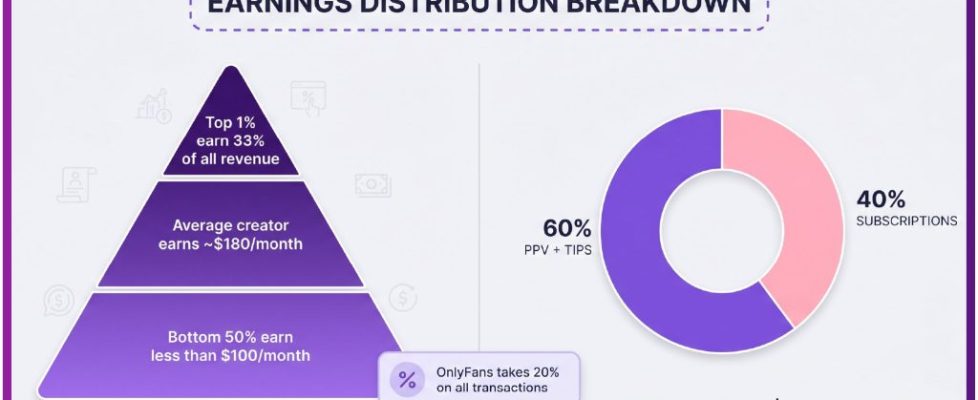
The platform takes a 20% fee on all of it, so the creator keeps 80%. That split applies to subscriptions, PPV unlocks, tips, and paid messages alike. It is consistent across page types.
To estimate monthly message spend from the common range:
- Count how many free pages you follow and how many send paid messages weekly.
- Multiply weekly paid messages by the $3-$5 range to get a weekly band.
- Multiply that band by four to get a rough monthly figure.
- Add any PPV unlocks separately, since those are one-off rather than recurring.
This gives a planning number rather than a surprise. The 20% platform fee does not change what you pay; it changes what the creator receives.
Warning: paid chat is charged per message, not per conversation. A long exchange at $5 per message adds up faster than most subscribers expect in the first month.
When a Free Page Adds a Subscription Fee
Creators can convert a free page to a paid one. When that happens, the base price must sit within the platform range of $4.99 to $49.99. Promotional first months can fall below $4.99, such as a $3 first month, but the standing base price cannot.
If you already subscribed at $0 and the page converts, your auto-renew does not silently continue at the new price. Auto-renew stops when the price rises. Your existing access lasts until the paid period you already hold ends, then the subscription lapses unless you actively resubscribe at the new rate.
| Scenario | Auto-Renew State | Access After Change |
|---|---|---|
| Page stays free at $0 | Continues at $0 | Unchanged; PPV remains the main gate |
| Converts to paid at $4.99 | Stops; requires new consent | Lasts until the current period ends, then lapses |
| Converts with a promo first month | Stops; promo price applies only if you resubscribe | Promo month runs, then standard base price on renewal |
This protects subscribers from an unannounced price jump. The trade-off is that a converted page you liked will quietly go dark unless you take action.

Reading Free Pages Through BestOnlyFans Data
OnlyFans has no built-in discovery feed or directory, which is why ranking sites exist. They fill a gap the platform deliberately leaves open. A ranking card lets you compare pages before you spend attention on them.
BestOnlyFans cards summarize signals that matter for free pages specifically: posting activity, price history, and how densely a page relies on PPV. A page that posts rarely but gates heavily behaves differently from one that posts often and gates lightly.
- Activity: how recently and how often the page posts to the feed
- Price history: whether the page was free, converted, or changed tiers
- PPV density: how much of the content is locked versus open
- Tier status: whether the base price is $0 or within the $4.99-$49.99 range
Anyone comparing pages side by side can use a onlyfans profile viewer free online to check profile basics without subscribing first. That reduces the odds of following a page whose actual content sits entirely behind gates you did not anticipate.
None of these signals tell you whether you will like a page. They tell you what the page’s structure implies about cost.
Setting a First-Month Cap for a $0 Page
A $0 page is easy to follow and easy to overspend on, because nothing at signup signals a limit. Set the limit yourself before you follow the second or third page. The cap should cover PPV unlocks and tips together.
Pick a number you would be comfortable losing in a month, then treat it as fixed. Free entry makes it tempting to add pages; the cap is what keeps the total predictable.
- Choose a monthly ceiling for PPV and tips combined before following anything.
- Track each unlock and tip as it happens, not from memory at month end.
- Review the running total weekly and stop unlocking once you reach the cap.
- At month end, compare the total to the ceiling and adjust the next month’s number.
Subscription auditing works the same way for paid tiers: the number you set in advance beats the number you discover afterward. A $0 entry point does not change that principle.

Two habits make the cap hold. First, check the unlock price before tapping; it is shown on every locked message. Second, keep the card on file current so the $0.10 verification hold clears cleanly rather than triggering a support ticket.
Account safety matters here too. Enable two-factor authentication and review login activity, because a compromised account can unlock content and send tips on your card. Phishing pages that mimic the login screen are a common route in.

Card and login hygiene also affects disputes. If an unlock was not authorized by you, the card issuer’s chargeback process is the formal route, and it works better when your account shows no signs of compromise.
FAQ
Does joining a $0 OnlyFans page charge my card?
No charge in the ordinary sense. A $0.10 card verification hold is placed when the card is added, and it is refunded within days. The subscription itself costs nothing, and no recurring charge appears while the page stays at $0.
What is the maximum PPV unlock on a free OnlyFans page?
A single PPV message can unlock for up to $50. The ceiling is per message, so a creator who sends several locked messages can present several separate unlocks. Nothing forces you to open any of them.
If a free page converts to paid, does my access stop?
Not immediately. Auto-renew stops when the price rises, and your access continues until the paid period you already hold ends. After that, the subscription lapses unless you resubscribe at the new base price, which must be at least $4.99.
How do I estimate monthly PPV spend before following a free page?
Check how often the page posts locked messages and what typical unlock prices look like. Multiply a realistic weekly count by the common $3-$5 paid-message range, add expected unlocks, and treat that as your working figure before you subscribe.